Guide to Modern Emacs Completion: vertico, corfu & friends
Table of Contents
A good completion system can make navigating an app like walking over clouds. A terrible one is like walking barefoot over spiky stones. Every step of the way will hurt. Unfortunately Emacs’ defaults make for quite the thorny walk. Fortunately that is very fixable.
This guide will explain the necessary concepts and go through all of my configuration for the relevant packages of the “minad stack” (vertico, consult, corfu & friends) and some more. The setup is tailored toward modern sensibilities (fuzzy finding, LSP completions) and assumes you can tweak an elisp configuration to your needs.
Types of Emacs completion #
The most important thing to understand about auto-completion in Emacs is that there are two kinds:
- Completing-read: this is your minibuffer (M-x),
find-file, and all those other functions that prompt you at the bottom of the screen.
- Completion-at-point (and completion-in-region): these complete text inside of a buffer (usually assigned to TAB.)
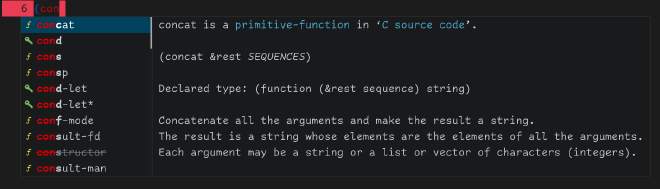


With that understood, suddenly those cryptic package headlines make more sense:
- “🔍 consult.el - Consulting completing-read”
- “🏝️ corfu.el - COmpletion in Region FUnction”
Completion styles #
completion-styles define the matching algorithms used.
After years of fzf (ab)use I instinctively use spaces to separate queries for completing-read prompt (e.g. “a b”.)
This is supported by orderless.
Default styles plus orderless and I’m content to the point that I had not felt the need to fiddle with it.
Configuration code for completion styles + orderless
completion-styles checks for matches in order.
So go from strictest to losest.
(use-package orderless
  :custom
  (orderless-matching-styles '(orderless-prefixes))
  (completion-ignore-case t)
  :config
  (set-face-attribute 'orderless-match-face-0 nil
                      :foreground "#d70000")
  (set-face-attribute 'orderless-match-face-1 nil
                      :foreground "#005fd7")
  (set-face-attribute 'orderless-match-face-2 nil
                      :foreground "#007f3a")
  (set-face-attribute 'orderless-match-face-3 nil
                      :foreground "#d700d7"))

(setq completion-styles '(basic substring initials orderless)
      completion-category-overrides '((file (styles basic partial-completion))))
Completing-read #
I consider the configuration of the minibuffer UI critical
In my first 6 months of Emacs, the god-awful user experience of fido-mode and find-file really made me not want to use Emacs.
I was used to insanely fast fuzzy finders everywhere.
Emacs’ default completing-read felt like from a different century (which it is.)

Vertico is a great improvement. Marginalia adds context. Just that already makes for a much improved experience. Even if you don’t like the vertical list style, vertico got you covered (visual demo of the different styles by Karthink.)
Configuration code for vertico and marginalia
(use-package vertico
  :demand t
  :bind (:map minibuffer-local-map
              ("<tab>" . vertico-next)
              ("<backtab>" . vertico-previous))
  :custom
  (vertico-cycle t) ; C-n at the bottom of the list loops around to the top
  :config
  (vertico-mode t)
  (vertico-reverse-mode t)

  ; Verticos highlight font was clashing with my completion part, so adjust the font faces
  (set-face-attribute 'vertico-current nil
                      :weight 'bold
                      :inverse-video nil
                      :foreground "#ffbf00"
                      :background "grey20")
  (set-face-attribute 'completions-common-part nil
                      :weight 'bold
                      :foreground "#d70000")
  (set-face-attribute 'minibuffer-prompt nil
                      :foreground "#ffbf00")
  )


(use-package marginalia
  :custom
  (marginalia-align 'right)
  :config
  (marginalia-mode t)

  (set-face-attribute 'marginalia-documentation nil
                      :inherit nil
                      :slant 'italic
                      :foreground "grey43")
  (set-face-attribute 'marginalia-key nil
                      :foreground "#00ff5f")
  )
For whatever reason my vertico has some indicators in the right fringe and this is the only way (I found) to get rid of them:
(defun jn/vertico-hide-fringe-and-truncation-indicators ()
  (when vertico-mode
    (setq-local fringe-indicator-alist
                (let ((a (copy-alist fringe-indicator-alist)))
                  (setf (cdr (assq 'continuation a)) nil)
                  (setf (cdr (assq 'truncation  a)) nil)
                  a))
    (setq-local truncation-string "")))
(add-hook 'minibuffer-setup-hook
          #'jn/vertico-hide-fringe-and-truncation-indicators)
Many functions will benefit from a nice completing-read UI setup.
Fuzzy file search #
For 98% of my file search I use a fuzzy finder. It gets me where I want to go quicker than traversing the directory tree. For this I use affe.1

affe-find only searches the current directory (or project.)
To use it for the whole system some customization is needed.
There is a reason that affe-find from the home directory is not offered by the package author.
Without some cleanup you will be overwhelmed by irrelevant matches.
Though with ripgrep as our blazing fast file finder we can exclude matches like this:
- pass a
--globflag to the command, with a pattern to ignore - create a
.rgignorewith a list of files in any directory root
With that, the number of matched files gets reduced to an amount where search feels instant.
I have these different bindings to invoke affe (ordered by frequency of use):
- Search for a file on the system
- Search for a file in the current project
- Search for a directory on the system
Configuration code for affe
For one-off exclusions I use local .rgignore files (e.g. in ~ and ~/.config.)
For file type or repeated directory exclusions I use ignore flags.
(defvar rg-ignore-flags
  "-g \"!*.mp3\" -g \"!*.jpg\" -g \"!*.JPG\" -g \"!*.jpeg\" -g \"!*.png\" \
  -g \"!*.mkv\" -g \"!*.mp4\" -g \"!*.avi\" -g \"!*.zip\" -g \"!*.ddl\" \
  -g \"!*.ods\" -g \"!*.xlsx\" -g \"!*.m3u\" -g \"!*.url\" -g \"!*.aac\" \
  -g \"!*.mpc\" -g \"!*.sql\" -g \"!*.ydb\" -g \"!dist/\" \
  -g \"!.git/\" -g \"!git/*\" -g \"!node_modules/\" -g \"!*cache/\" \
  -g \"!.cache\" -g \"!vendor/\" \
  -g \"!.pki/\" -g \"!.local/share/*/\" \
  -g \"!coverage\" -g \"!build/\" -g \"!var/\" -g \"!npm/\" \
  -g \"!Library/\" -g \"!.DS_Store\" -g \"!.stfolder\""
  "Exclusion flags for usage with ripgrep commands.")
(defvar rg-find-files-command
  (format "rg -L --ignore --hidden --files --color=never %s" rg-ignore-flags)
  "Command for finding files with ripgrep.")
(defvar rg-find-directories-command
  (format "rg-dir -L --ignore --hidden --color=never %s" rg-ignore-flags)
  "Command for finding directories with ripgrep.")

(defun affe-find-file (&optional dir) (interactive) ; default dir is cwd
       (setq affe-find-command rg-find-files-command)
       (affe-find dir))
(defun affe-find-directory (&optional dir) (interactive) ; default dir is cwd
       (setq affe-find-command rg-find-directories-command)
       (affe-find dir))
(defun affe-find-file-home () (interactive)
       (affe-find-file (substitute-in-file-name "$HOME")))
(defun affe-find-directory-home () (interactive)
       (affe-find-directory (substitute-in-file-name "$HOME")))

(use-package affe
  :bind (("H-f"   . affe-find-file-home)
         ("H-M-f" . affe-find-file)
         ("H-s"   . affe-find-directory-home))
  :custom
  (affe-count 5000))
If you want to have the
Improved find-file #
I do use find-file to initiate tramp connections.
find-files default TAB and RET behaviors leave a lot to be desired.
Might be a skill issue, but I found myself always writing the path by hand for those deeply nested files.
vertico-directory gives me exactly the intuitive navigation I expect:
(use-package vertico-directory
  :after vertico
  :ensure nil
  :bind (:map vertico-map
              ("RET" . vertico-directory-enter)
              ("DEL" . vertico-directory-delete-char)
              ("M-DEL" . vertico-directory-delete-word))
  :hook (rfn-eshadow-update-overlay . vertico-directory-tidy))
Consult for better functions #
Consult offers a host of useful interactive functions built on completing-read. Many of them are superior replacements for built-in functions.

Configuration code for consult
(use-package consult
  :bind (;; new functionality
         ("M-g l" . consult-line)
         ("M-g m" . consult-mark)
         ("H-r" . consult-ripgrep)
         ;; replace built-in functions with superior versions
         ("M-y" . consult-yank-pop)
         ("C-x 4 b" . consult-buffer-other-window)
         ("C-x t b" . consult-buffer-other-tab)
         ([remap Info-search] . consult-info)
         ([remap list-buffers] . ibuffer)
         ))
If you want to have the
The consult interface I rely on most heavily is consult-buffer.
It can be modded to achieve this:

What are we looking at? We got multiple sections “Perspective Buffer”, “Special Buffer”, “File” and “Bookmark” off-screen. So, we get filtering by perspective workspace, access to recent files and bookmarks. Already great. The “Special Buffer” is where the real flexibility of this system comes in.
I use popper to relegate help buffers, compilation output and those sorts of buffers to a separate “popup stack”.
Some get hidden completely and the rest don’t disturb my layout and are easily hidden.
All well and good.
A popup buffer, even a suppressed one, will still show up at the top of your buffer list, as the most recently accessed.
Distracting clutter.
Well, consult-buffer allows you to customize the sections.
With this I segregated popup buffer off into their own section.
Separate and not equal.
Configuration code for consult-buffer + popper + perspective
(setq jn/secondary-buffer-regexes ; alist in popper format
      '("\\*Messages\\*"
        ("\\*Warnings\\*" . hide)
        "\\*Man.*"
        "\\*Help.*"
        "\\*helpful.*"
        ("\\*Compile.*" . hide)
        ("\\*Org-Babel Error Output\\*" . hide)
        ("\\*Async Shell Command\\*" . hide)
        "\\*slime.*"
        ("\\*inferior-lisp\\*" . hide)
        ("\\*sldb.*" . hide)
        "\\*Backtrace\\*"
        "\\*org-search\\*"
        "\\* Merriam-Webster"
        "\\*Flymake diagnostics"))

(use-package popper
  :custom
  (popper-reference-buffers jn/secondary-buffer-regexes)
  (popper-mode-line '(:eval ""))
  (popper-window-height 12) ; default function maxes out at 33%, which seems too small to me
  :defer nil
  :config
  (popper-mode +1)

  (defhydra popper-hydra (:hint nil)
    "
_n_ext    _p_revious    promo_t_e/demo_t_e    show/_u_nshow"
    ("n" popper-cycle)
    ("p" popper-cycle-backwards)
    ("t" popper-toggle-type)
    ("u" popper-toggle)
    ("q"   nil nil)
    ("C-g" nil nil)
    ("ESC" nil nil))
  :bind (("H-u"   . popper-toggle) ; quick show/hide popups
         ("H-U"   . popper-hydra/body)))

(defun jn/strip-alists (buffers)
  (mapcar
   (lambda (item)
     (if (consp item)
         (car item)
       item))
   buffers))

(setq jn/secondary-buffer-pure-regexes (jn/strip-alists jn/secondary-buffer-regexes)) ; normalize into regexes

(use-package consult
  :custom
  (popper-group-function #'popper-group-by-perspective)
  :config
  (consult-customize consult-source-buffer :hidden t :default nil) ; disable
  (consult-customize persp-consult-source
                     :name "Perspective Buffer"
                     :default t
                     :items '(lambda () (consult--buffer-query
                                         :sort 'visibility
                                         :as #'buffer-name
                                         :predicate (lambda (buf) (persp-is-current-buffer buf t))
                                         :exclude (append jn/secondary-buffer-pure-regexes '("^ \\*"))))) ; hidden buffers like minibuffer

  (defvar consult-special-buffer
    `( :name "Special Buffer"
       :default nil
       :face consult-buffer
       :category buffer
       :history buffer-name-history
       :state ,#'consult--buffer-state
       :items ,(lambda () (consult--buffer-query
                           :sort 'visibility
                           :as #'buffer-name
                           :predicate (lambda (buf) (persp-is-current-buffer buf t))
                           :include jn/secondary-buffer-pure-regexes
                           ))))

  (add-to-list 'consult-buffer-sources consult-special-buffer)
  (add-to-list 'consult-buffer-sources persp-consult-source)

  (consult-customize consult-source-bookmark
                     :enabled (lambda () (equal (persp-current-name) "main")))
  (consult-customize consult-source-recent-file
                     :enabled (lambda () (equal (persp-current-name) "main")))
)
In your own scripts #
completing-read can be powerfully used in your own elisp scripts, as demonstrated by Álvaro Ramírez.
I use it all the time.
Here to pick a type from a pool of candidates:
(completing-read "What type? " '("Project" "Design" "Resource") nil t)
You can reach for gum if you want a similarly nice experience in your shell scripts.
In-buffer completion #
I use corfu as my completion-at-point UI. I would recommend it over company, because corfu uses the built-in completion API (company implements it’s own API incompatible to Emacs’.) Even if a you depend on a package that only provides a company-backend, corfu got you covered.
Since corfu enhances the built-in API, it will just work out of the box for modes that bring their own capfs (completion at point functions.)
Like account completion in ledger-mode:
Configuration code for corfu
;; TAB key: fix indentation if needed, otherwise perform completion
(setq tab-always-indent 'complete)

(use-package corfu
  :hook (after-init . global-corfu-mode)
  :custom
  (corfu-cycle t) ; cycle around to first entry after reaching the last
  (corfu-preview-current nil) ; don't expand text at point until I press return
  (corfu-min-width 20)
  (corfu-on-exact-match 'insert) ; complete if there is only a single candidate
  (corfu-quit-no-match t)
  (corfu-quit-at-boundary t)
  :config
  (setq corfu-popupinfo-delay '(1.25 . 0.5))
  (corfu-popupinfo-mode 1) ; shows documentation next to completions

  ;; sort by input history
  (with-eval-after-load 'savehist
    (corfu-history-mode 1)
    (add-to-list 'savehist-additional-variables 'corfu-history))
  )
Add more capfs #
With cape we can easily add further completion sources (completion at point functions) to be used by corfu. I use: words in the buffer and file system paths.
Configuration code for cape
(use-package cape
  :defer 1
  :config
  (add-hook 'completion-at-point-functions #'cape-dabbrev 20) ; words from buffer
  (add-hook 'completion-at-point-functions #'cape-file 20))
Code completion #
Thanks to language servers (see LSP explainer), nice auto-completion for code is now easy to achieve consistently.

The icons in the UI are added by kind-icon.
Configuration code for eglot and kind-icon
(use-package eglot
  :ensure nil
  :functions (eglot-ensure)
  :commands (eglot)
  :hook (prog-mode . eglot-ensure)
  :config
  (set-face-attribute 'eglot-highlight-symbol-face nil
                      :foreground "#ffd700"
                      :underline t)
  )

(use-package kind-icon
  :after corfu
  :config
  (add-to-list 'corfu-margin-formatters #'kind-icon-margin-formatter))

;; fix overly large icons (https://github.com/jdtsmith/kind-icon/issues/22)
(setq kind-icon-default-style
      '(:padding -1 :stroke 0 :margin 0 :radius 0 :height 0.4 :scale 1))
GitHub Copilot #
GitHub Copilot can be used as an evolved auto-completion. It not only completes the “word” at hand, but “finishes the whole thought.” Often it does what you want. Faster than you could ever type it.
If you got free access, it is worth to trying, to see if it fits your development style. That is if you are a are a student or your employer pays for it.
For me was not a good fit. I always turned it off and never turned it on again. I felt it constantly interrupted my thought. Imagine you get a proposal before you even had time to think about what the piece of code should do. You have no basis to evaluate it on, since you don’t know what you want. And at that point the proposal influences what you think is best. I much prefer the agentic coding loop: I think, write it down as specs/idea, pass it to the agent and only, have it work and only then see the generated code.
Conclusions #
Hopefully this guide gave you all the hints to successfully set up a feature-complete completions system that meets your needs. Most of the linked packages have great documentation, if you should run into problems.
For more from me, feel free to subscribe to one of the RSS feeds.
For corrections or suggestions on this article, please email me🙂
Have a great day!
References #
This is an entry for the Emacs Carnival. See other contributions on the topic of completion.
- My complete literate config
- Protesilaos literate config (completions section)